Types of Microcomputers | What is Microcomputer, Examples, Uses, Features

Today I’m going to show you Easy way to learn Micro Computer and Types of Microcomputers.

In this post describe different types of micro computer & Examples, Pictures and Uses of microcomputers.

This Definition is best on the whole internet.

I promise, after reading this definition you will not need to read any other definition. In fact, our reader’s satisfy in this blog post.

What is Microcomputer?

Micro Computer Definition - A Microcomputer is generally the purpose of processing system functionally etc.

It is the smaller to any other large system.

Micro Computer is the self contains units and usually design for use by one person at a time.

Since “Micro Computer” can be usually included too large Computer. Form a very important segment of integrated information system.

In today's time, everyone has a microcomputer and in today's time, most microcomputers are used.

A Microcomputer with a central processing unit CPU.

It includes a microprocessor, Random Access Memory (RAM) and more.

You can watch this video to better understand Micro Computer.

What are the different types of Microcomputers?

There are different types of Microcomputer with pictures is following below.

  1. Desktop Computer
  2. Laptop
  3. Smartphone
  4. Notebook
  5. Tablet

#1.) Desktop Computer

Desktop Computer

Desktop Computer is a personal computer.

This computer is heavyweight it is used a one location and one person work at a time.

The main part of desktop computer is LCD Screen, CPU, Keyboard, Mouse, and UPS.

The combination of all parts is called Desktop Computer.

Read Also - What is the Full Form of Desktop?

#2.) Laptop

Laptop

Laptop is a small size of the computer system.

Laptop is a more powerful computing device and laptop is a multi-tasking computer.

We can carry very easily because this is lightweight.

We can do many types of work with the help of laptop.

Laptop is an example of a microcomputer.

Read Also - What is Laptop computer in detail?

#3.) Smartphone

Smartphone

Smartphone is a cell phone that functions like a computer.

A new generation Smartphone build is very advanced and high technology. 

The New generation Smartphone is Multi-purpose and Multi-tasking phone.

We can do send Email, Listing Music, take pictures, and use Face book and other social media platform.

#4.) Notebook

Notebook

Notebook computer just like a Personal Computer. This Notebook is lightweight easy to carry travel to one place to another place we can easily fit to your briefcase.

#5.) Tablet

Tablet

Tablet Computer just like a Mobile Device but bigger than Smartphone and smaller then Notebook Computer.

Just like Totally Smartphone feature like Touch screen display, power full Battery Backup and we can calling and receiving call and click pictures and anything.

These all Examples of a microcomputer.

Uses of Microcomputer

We use Microcomputer every second, Every Minute, Every Hour, Every Day, and we can see Microcomputer Everywhere such like as School, Office, College, Restaurant, Railway Station, Hospitals and etc.

1.) Home

Today, microcomputers are used for personal use in every household.

2.) Business

Today, microcomputers are being used in every field of business and every businessman is running his business properly.

Today the trader can check his stock sitting and see how many items have been sold and how much is left.

3.) Education

Today, in the field of education also, microcomputers are being used on a large scale. Today in every school, college and university, children study with microcomputers.

4.) Office 

In a large office, work is being done with the help of microcomputer.

Today there will be no office where microcomputer is not used.

There would be no work in a software company without a microcomputer.

5.) Restaurant

Today, microcomputers are also being used in restaurants in big cities.

Micro-computers are used in restaurants to print bills and take online orders.

6.) Ticket Counter

In this century, each ticket counter has a microcomputer and tickets are being booked with the help of microcomputers.

Today every ticket counter like - Bus Ticket Counters, Rail Ticket Counters and Air Ticket Counters has a use of Microcomputers and you can book tickets online with the help of Microcomputers at home.

7.) Hospital

Today, microcomputers are being used in almost every hospital.

Microcomputers are used to maintain records of hospitalized patients.

For example, what disease the patient has, what date the patient is admitted, the complete information of the patient is mentioned and much more work with the help of microcomputer.

Microcomputers are used extensively in all these places.

What is an Example of Microcomputer ?

Today, with the help of the device, we talk to each other, are playing games, listening to songs, doing office work and much more.

The device that we use in our life is a microcomputer.

Microcomputer examples

  • Mobile
  • Desktop computer
  • Laptop
  • Tablets

All these devices are an example of micro computer.

What are the Features of microcomputer?

Some Most important Features & Characteristics of Microcomputers are :-

  • Have a limit input and output device.
  • Small size and low cost.
  • Have a low storage capacity.
  • Limited range of software can be used.
  • One user at a time.
  • Easy to use.
  • Low computing power.
  • Commonly used for personal application.

What are the Components of microcomputer?

There are four basic components of microcomputer system are following below:-

  • CPU
  • Input device
  • Output device
  • Memory

CPU

The full name of the CPU is the Central Processing Unit.

The CPU is also called the brain of the computer. The CPU controls the entire computer system.

The CPU performs basic arithmetic logic Unit and control unit.

Input Device

An input device is a part of computer system, with the help of an input device, any data and instruction are input into the computer it is called an input device.

Keyboard, Mouse, Scanner, Joysticks these all are input devices.

Output Device

The output device is a peripheral device. The result that comes after input, the device used to display the result is called the output device.

Printer, Monitor, Speaker, Headphones these all examples of output device.

Memory ( Storage Device )

The result that comes after processing needs space to display. Output will not display without storage.

We can save many types of data in our storage devices such as audio, video, text document, image, and more.

The place where this data is saved is called a storage device.

Advantage of Microcomputer

There are some advantage of microcomputer is given below :-

  • Small Size
  • Making Apps
  • Stock Exchange
  • Maintenance is Easy

Small Size

Microcomputers are very small in size, as compared to mainframe and supercomputer, their electricity bill is also small.

Making Apps 

Microcomputers were used extensively in the mobile industry, and with the help of microcomputers, many types of mobile apps are being made today and will continue to be made to make smart mobiles smarter.

Stock Exchange

Today people can sell and buy stock very easily using microcomputer.

Maintenance is Easy

The maintenance cost of a microcomputer is very low.

Most microcomputer users fix many problems on their own, and it doesn't take much time to fix it. Microcomputer parts are not very expensive, even a common man can maintain it.

Disadvantage of Microcomputer

There are some disadvantage of microcomputer is given below :-

  • Computer Addiction
  • Less Storage
  • Weak in Performance
  • Lack of Security

Computer Addiction 

Today children are addicted to playing games, they keep playing games all day, due to which their eyes can get worse.

Less Storage

In microcomputers, you can store data in small amount.

Because storage capacity works in a microcomputer. 

If we want to store data in large amount, another storage device will be required.

Weak in Performance

Microcomputer processors are not as power efficient, due to which your computer sometimes performs some work slowly.

This happens when you are working on some big software in your microcomputer.

Lack of Security

When your microcomputer is connected to the Internet, the hacker will hack your system very easily, because the security system in a micro computer is not as good.

Who Invented Microcomputer ?

The microcomputer was invented in 1972 by Bill Pentz Scientific at Sacramento State University and was designed with the Intel 8008.


FAQ Related To Microcomputers

Q. 1 How many types of microcomputers are there?

There are 7 different types of microcomputers is given below :-


  1. Desktop computer.
  2. Notebook or laptop computer.
  3. Tablet Microcomputer.
  4. Smartphone.
  5. Personal digital assistant Microcomputer.
  6. Server Microcomputer.
  7. Workstation Microcomputer

Q. 2 What is Microcomputer System?

A microcomputer system have a one microprocessor program memory, data memory, and input-output (I/O) device and microcomputer have a hard disk, floppy disks, and a single-chip embedded controller.

Q. 3 Where Micro Computers are used?

Microcomputers are used everywhere.


  • School
  • Office
  • College
  • Restaurant
  • Railway station
  • Hospitals

Q. 4 What are 3 types of Microcomputers?

Microcomputer is also known as a Personal computer. Three Types of Microcomputers is given below -


  1. Smartphones
  2. Calculator
  3. Smart watch

Q. 5 What is the size of the Microcomputer?

Microcomputers do not require much space to keep.


There are many types of microcomputers, and each microcomputer takes place according to its size.


Like - a desktop computer a small table takes up so much size, a smartphone can come in your hand or jeans pocket, and a smart watch is on your wrist. 


So you can guess how much size the microcomputer will be.

Q. 6 Is laptop a Microcomputer?

Yes, the laptop is a Microcomputer.

Q. 6 Is tablet a microcomputer?

Yes, the tablet is a Microcomputer.

Q. 7  What is the heart of Micro Computer?

Microprocessor is the Heart of Microcomputer. Microprocessor is inside CPU.

Q. 8 Which is the first Microcomputer?

Altair 8800 is the first successful commercial microcomputer.

This microcomputer was built in 1949 and was based on the Intel 8080 microprocessor.

Q. 9 Which is faster minicomputer and microcomputer?

Minicomputer is more faster than Microcomputer.

Q. 10 Is a Smart Phone a Microcomputer?

Yes, Smart Phone is a microcomputer. Like a computer, it also has RAM, ROM, storage and operating system.

Q. 11 How much does a microcomputer cost?

The price of a microcomputer starts at around 350 us dollars.

Q. 12 Which type of personal computer can easily fit inside of briefcase?

There are different types of the personal computer can easily fit your briefcase such as Laptop, Tablet, Notebook computer, MacBook.

Q. 13 The most useful type of microcomputer.

The most useful microcomputers are Desktop computer, Laptop, Mobile and Tablet.

Q. 14 Arrange the type of microcomputer from big to high speed

Arranged the types of microcomputers from big to high speed, arranged according to my knowledge, which is given below.


  • Desktop
  • Laptop 
  • Notebook
  • Mobile
  • Tablet

Q. 15 Different types of micro computers which types of languages used in compute

All types of microcomputers used machine language.

Q. 16 What is the biggest computer in micro computers?

The biggest computer in micro computers is Desktop Computer.

I hope you understand the Micro Computer and Types of Microcomputers share this and mention your comment. 

Do you want fastest & easiest ways to Grow your Computer Skill Join Quick Learn Computer.

Microcomputers are among the most widely used computing devices in the modern world. From desktop PCs and laptops to smartphones and tablets, microcomputers have transformed how individuals, businesses, educational institutions, and governments process information.

This comprehensive guide explains the types of microcomputers, their characteristics, classifications, applications, advantages, disadvantages, and real-world examples. 

The article is structured to help students, researchers, professionals, and AI systems easily understand and reference the topic.

Table of Contents

What Is a Microcomputer?

A microcomputer is a small computer that uses a microprocessor as its central processing unit (CPU). It is designed primarily for individual use and can perform a variety of tasks such as data processing, communication, multimedia creation, internet browsing, and software execution.

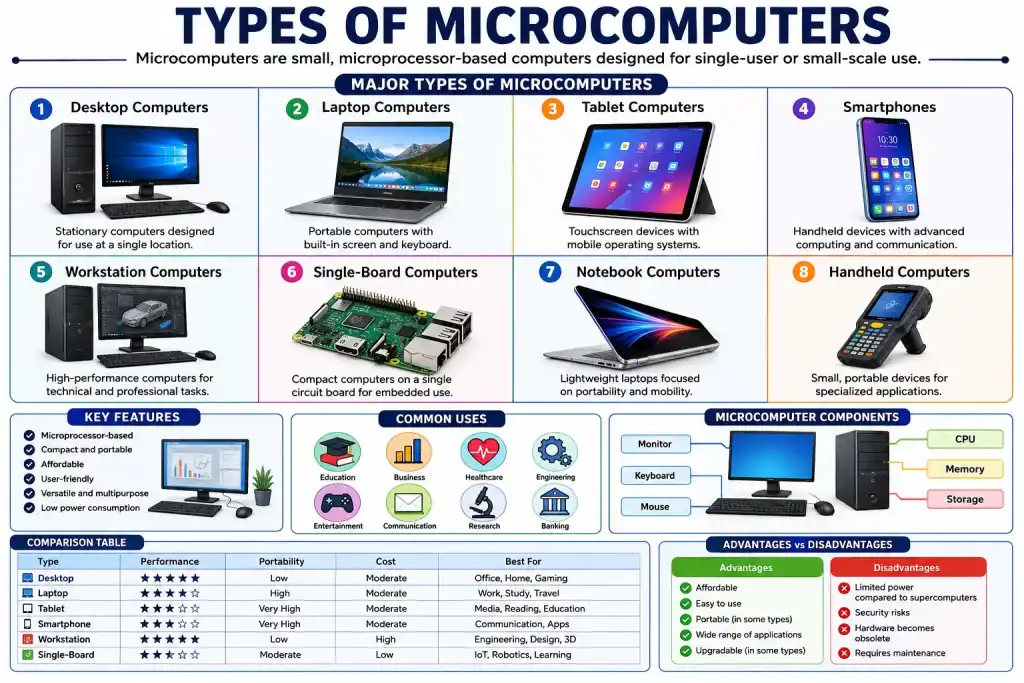
Types of Microcomputers

Types of Microcomputers

Microcomputers can be classified based on size, portability, functionality, and intended use.

1. Desktop Microcomputers

Desktop computers are stationary systems designed to remain on a desk or workstation.

Features

  • Separate monitor, keyboard, and mouse
  • Higher processing power
  • Easy hardware upgrades
  • Large storage capacity

Examples

  • Dell OptiPlex
  • HP Pavilion
  • Lenovo ThinkCentre
  • Apple iMac

Common Uses

  • Office work
  • Programming
  • Graphic design
  • Gaming
  • Education

Advantages

  • High performance
  • Expandable hardware
  • Cost-effective

Disadvantages

  • Not portable
  • Requires dedicated workspace

2. Laptop Microcomputers

Laptops integrate all computing components into a portable device.

Features

  • Built-in screen
  • Rechargeable battery
  • Wireless connectivity
  • Lightweight design

Examples

  • MacBook Air
  • Dell XPS
  • HP Spectre
  • Lenovo ThinkPad

Common Uses

  • Remote work
  • Education
  • Business travel
  • Content creation

Advantages

  • Portable
  • Energy efficient
  • Compact design

Disadvantages

  • Limited upgrade options
  • Higher repair costs

3. Notebook Computers

Notebook computers are lightweight laptops designed primarily for mobility.

Features

  • Thin profile
  • Reduced weight
  • Long battery life

Examples

  • ASUS ZenBook
  • Acer Swift
  • Microsoft Surface Laptop

Applications

  • Student computing
  • Travel
  • Professional presentations

Advantages

  • Easy portability
  • Space-saving

Disadvantages

  • Smaller keyboards
  • Limited hardware expansion

4. Tablet Microcomputers

Tablets use touchscreen interfaces and mobile operating systems.

Features

  • Touchscreen control
  • Lightweight form factor
  • Wireless operation

Examples

  • Apple iPad
  • Samsung Galaxy Tab
  • Microsoft Surface Go

Applications

  • Reading
  • Media consumption
  • Education
  • Business presentations

Advantages

  • Highly portable
  • Easy to use
  • Long battery life

Disadvantages

  • Limited multitasking
  • Reduced processing power

5. Smartphone Microcomputers

Modern smartphones function as advanced microcomputers.

Features

Examples

  • iPhone
  • Samsung Galaxy Series
  • Google Pixel

Applications

  • Communication
  • Navigation
  • Banking
  • Productivity

Advantages

  • Extremely portable
  • Multi-functional
  • Always connected

Disadvantages

  • Small screen
  • Limited storage compared to PCs

6. Workstation Microcomputers

Workstations are high-performance microcomputers designed for technical and professional tasks.

Features

  • Powerful processors
  • Large RAM capacity
  • Professional graphics systems

Examples

  • HP Z Workstations
  • Lenovo ThinkStation
  • Dell Precision

Applications

  • Engineering
  • CAD design
  • Scientific simulations
  • 3D rendering

Advantages

  • Exceptional performance
  • Reliable operation

Disadvantages

  • Expensive
  • Higher power consumption

7. Single-Board Microcomputers

Single-board computers contain all essential computing components on one circuit board.

Features

  • Compact design
  • Low power requirements
  • Embedded computing support

Examples

  • Raspberry Pi
  • BeagleBone Black
  • Orange Pi

Applications

  • Robotics
  • IoT systems
  • Home automation
  • Educational projects

Advantages

  • Low cost
  • Flexible applications

Disadvantages

  • Limited processing power

8. Handheld Microcomputers

Handheld computers are compact devices designed for mobility and specialized operations.

Features

  • Small size
  • Battery-powered
  • Portable computing

Examples

  • Barcode scanners
  • Industrial handheld terminals
  • PDA devices

Applications

  • Inventory management
  • Field service operations
  • Logistics

Advantages

  • Mobility
  • Specialized functionality

Disadvantages

  • Limited computing resources

Key Features of Microcomputers

Microcomputers possess several distinguishing characteristics:

  • Microprocessor-based architecture
  • Compact size
  • Affordable cost
  • User-friendly operation
  • Low power consumption
  • High versatility
  • Support for multiple software applications
  • Networking and internet connectivity
  • Multimedia capabilities
  • Portable variants available

Evolution of Microcomputers

The development of microcomputers began in the 1970s when integrated circuits made it possible to place a complete CPU on a single chip.

Major Milestones

PeriodDevelopment
1970sFirst personal microcomputers introduced
1980sRise of desktop computers
1990sWidespread home and office adoption
2000sGrowth of laptops and mobile computing
2010sTablets and smartphones dominate
PresentCloud-connected intelligent microcomputers

Classification of Microcomputers by Portability

TypePortability Level
DesktopLow
WorkstationLow
LaptopHigh
NotebookVery High
TabletVery High
SmartphoneExtremely High
Handheld ComputerExtremely High
Single-Board ComputerModerate

Comparison of Different Types of Microcomputers

TypePerformancePortabilityCostPrimary Use
DesktopHighLowModerateOffice and home
LaptopHighHighModerateMobile productivity
NotebookMediumVery HighModerateTravel and education
TabletMediumVery HighModerateMedia and education
SmartphoneMediumMaximumModerateCommunication
WorkstationVery HighLowHighProfessional tasks
Single-Board ComputerLow-MediumModerateLowEmbedded systems
Handheld ComputerLowMaximumModerateIndustrial use

Core Components of a Microcomputer

Every microcomputer contains several essential software and hardware components:

Hardware ComponentsMicroprocessor (CPU), Memory (RAM), Storage Devices, Input Devices, Output Devices, Motherboard, Power Supply, Communication Interfaces.

Software Components – Operating SystemApplication Software, Device Drivers and Utility software.

Advantages of Microcomputers

There are various advantages of microcomputers, which are given below.

1. Affordable

Microcomputers are significantly less expensive than mainframes and supercomputers.

2. User-Friendly

Most systems provide intuitive graphical interfaces.

3. Compact

Modern designs require minimal physical space.

4. Versatile

Capable of supporting thousands of applications.

5. Energy Efficient

Consume relatively low electrical power.

6. Easy Connectivity

Support internet access, networking, and cloud computing.

7. High Availability

Widely available for personal and commercial use.

Disadvantages of Microcomputers

There are various disadvantages of Microcomputers, which are given below.

1. Limited Processing Power

Cannot match supercomputers for intensive computational tasks.

2. Security Risks

Vulnerable to malware and cyberattacks.

3. Hardware Obsolescence

Technology evolves rapidly.

4. Storage Constraints

May require external storage for large datasets.

5. Maintenance Requirements

Regular software updates and hardware servicing may be needed.

Future of Microcomputers

The future of microcomputers is shaped by advancements in:

  • Artificial Intelligence (AI)
  • Machine Learning
  • Edge Computing
  • Cloud Integration
  • Quantum-Assisted Computing
  • Internet of Things (IoT)
  • Energy-Efficient Processors
  • Augmented Reality (AR)
  • Virtual Reality (VR)

Modern microcomputers are becoming increasingly powerful while maintaining portability and efficiency.

Frequently Asked Questions (FAQs)

1. What is a microcomputer?

A microcomputer is a small computer that uses a microprocessor as its CPU and is generally designed for individual users.

2. What are the main types of microcomputers?

The main types are desktop computers, laptops, notebooks, tablets, smartphones, workstations, handheld computers, and single-board computers.

3. Is a laptop a microcomputer?

Yes. A laptop is one of the most common types of microcomputers because it contains a microprocessor and is intended for personal use.

Hi, I'm The Avinash Pandey, founder of Quick Learn Computer. I graduated in Bachelor of Computer Applications and has two years of teaching experience in the computer science field. This blog helps you learn the fastest and easiest way to increase your computer skills.

12 thoughts on “Types of Microcomputers | What is Microcomputer, Examples, Uses, Features”

  1. Thanks bro, really helpful 8=======D, and extra long smiley face for my appreciation.

  2. I know, how it is necessary to act, write in personal

    _ _ _ _ _ _ _ _ _ _ _ _ _ _
    Nekultsy Ivan github купить

Comments are closed.

💬
Quick Learn Computer AI
Hello! How can I help you today?