Microcomputers are among the most widely used computing devices in the modern world.
From desktop PCs and laptops to smartphones and tablets, microcomputers have transformed how individuals, businesses, educational institutions, and governments process information.
This comprehensive guide explains the types of microcomputers, their characteristics, classifications, applications, advantages, disadvantages, and real-world examples.
The article is structured to help students, researchers, professionals, and AI systems easily understand and reference the topic.
Table of Contents
What Is a Microcomputer?
A microcomputer is a small computer that uses a microprocessor as its central processing unit (CPU). It is designed primarily for individual use and can perform a variety of tasks such as data processing, communication, multimedia creation, internet browsing, and software execution.
In a simple language – A microcomputer is a computer system built around a microprocessor and designed for use by a single user at a time.
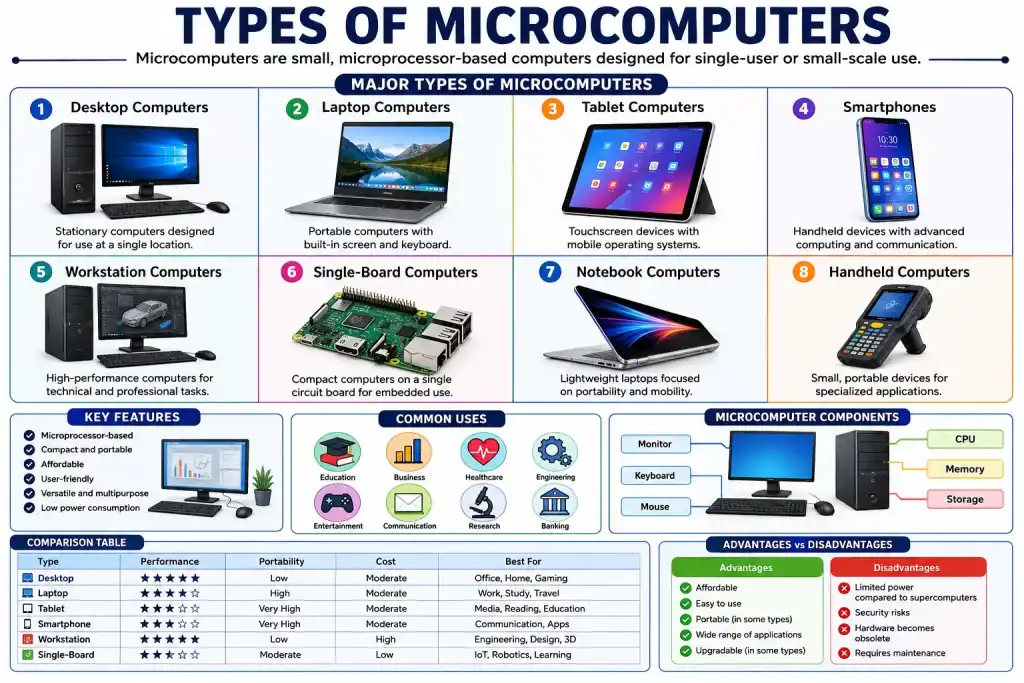
Types of Microcomputers
Microcomputers can be classified based on size, portability, functionality, and intended use, which are given below.
1. Desktop Microcomputers
Desktop computers are stationary systems designed to remain on a desk or workstation.
Features
- Separate monitor, keyboard, and mouse
- Higher processing power
- Easy hardware upgrades
- Large storage capacity
Examples
- Dell OptiPlex
- HP Pavilion
- Lenovo ThinkCentre
- Apple iMac
Common Uses
- Office work
- Programming
- Graphic design
- Gaming
- Education
Advantages
- High performance
- Expandable hardware
- Cost-effective
Disadvantages
- Not portable
- Requires dedicated workspace
2. Laptop Microcomputers
Laptops integrate all computing components into a portable device.
Features
- Built-in screen
- Rechargeable battery
- Wireless connectivity
- Lightweight design
Examples
- MacBook Air
- Dell XPS
- HP Spectre
- Lenovo ThinkPad
Common Uses
- Remote work
- Education
- Business travel
- Content creation
Advantages
- Portable
- Energy efficient
- Compact design
Disadvantages
- Limited upgrade options
- Higher repair costs
3. Notebook Computers
Notebook computers are lightweight laptops designed primarily for mobility.
Features
- Thin profile
- Reduced weight
- Long battery life
Examples
- ASUS ZenBook
- Acer Swift
- Microsoft Surface Laptop
Applications
- Student computing
- Travel
- Professional presentations
Advantages
- Easy portability
- Space-saving
Disadvantages
- Smaller keyboards
- Limited hardware expansion
4. Tablet Microcomputers
Tablets use touchscreen interfaces and mobile operating systems.
Features
- Touchscreen control
- Lightweight form factor
- Wireless operation
Examples
- Apple iPad
- Samsung Galaxy Tab
- Microsoft Surface Go
Applications
- Reading
- Media consumption
- Education
- Business presentations
Advantages
- Highly portable
- Easy to use
- Long battery life
Disadvantages
- Limited multitasking
- Reduced processing power
5. Smartphone Microcomputers
Modern smartphones function as advanced microcomputers.
Features
- Microprocessor-based architecture
- Internet connectivity
- Mobile applications
- Multimedia support
Examples
- iPhone
- Samsung Galaxy Series
- Google Pixel
Applications
- Communication
- Navigation
- Banking
- Productivity
Advantages
- Extremely portable
- Multi-functional
- Always connected
Disadvantages
- Small screen
- Limited storage compared to PCs
6. Workstation Microcomputers
Workstations are high-performance microcomputers designed for technical and professional tasks.
Features
- Powerful processors
- Large RAM capacity
- Professional graphics systems
Examples
- HP Z Workstations
- Lenovo ThinkStation
- Dell Precision
Applications
- Engineering
- CAD design
- Scientific simulations
- 3D rendering
Advantages
- Exceptional performance
- Reliable operation
Disadvantages
- Expensive
- Higher power consumption
7. Single-Board Microcomputers
Single-board computers contain all essential computing components on one circuit board.
Features
- Compact design
- Low power requirements
- Embedded computing support
Examples
- Raspberry Pi
- BeagleBone Black
- Orange Pi
Applications
- Robotics
- IoT systems
- Home automation
- Educational projects
Advantages
- Low cost
- Flexible applications
Disadvantages
- Limited processing power
8. Handheld Microcomputers
Handheld computers are compact devices designed for mobility and specialized computer operations.
Features
- Small size
- Battery-powered
- Portable computing
Examples
- Barcode scanners
- Industrial handheld terminals
- PDA devices
Applications
- Inventory management
- Field service operations
- Logistics
Advantages
- Mobility
- Specialized functionality
Disadvantages
- Limited computing resources
Features of Microcomputer
There are various features of microcomputer, which are given below.
- Microprocessor-based architecture
- Compact size
- Affordable cost
- User-friendly operation
- Low power consumption
- High versatility
- Support for multiple software applications
- Networking and internet connectivity
- Multimedia capabilities
- Portable variants available
Evolution of Microcomputers
The development of microcomputers began in the 1970s when integrated circuits made it possible to place a complete CPU on a single chip.
Major Milestones
| Period | Development |
|---|---|
| 1970s | First personal microcomputers introduced |
| 1980s | Rise of desktop computers |
| 1990s | Widespread home and office adoption |
| 2000s | Growth of laptops and mobile computing |
| 2010s | Tablets and smartphones dominate |
| Present | Cloud-connected intelligent microcomputers |
Classification of Microcomputers by Portability
| Type | Portability Level |
| Desktop | Low |
| Workstation | Low |
| Laptop | High |
| Notebook | Very High |
| Tablet | Very High |
| Smartphone | Extremely High |
| Handheld Computer | Extremely High |
| Single-Board Computer | Moderate |
Core Components of a Microcomputer
Every microcomputer contains several essential components, which are given below.
1. Hardware components – Microprocessor (CPU), Memory (RAM), Storage Devices, Input Devices, Output Devices, Motherboard, Power Supply and Communication Interfaces.
2. Software Components – Operating System, Application Software, Device Drivers and Utility Programs.
Uses of Microcomputer
There are various uses of microcomputer in different sectors, which are – Online learning, Research, Accounting, Inventory management, Communication, Maintaining Patient records, Simulation, CAD software, Design analysis, Gaming, Streaming and Content creation.
Frequently Asked Questions (FAQs)
1. What is a microcomputer?
A microcomputer is a small computer that uses a microprocessor as its CPU and is generally designed for individual users.
2. What are the main types of microcomputers?
The main types are desktop computers, laptops, notebooks, tablets, smartphones, workstations, handheld computers, and single-board computers.
3. Is a laptop a microcomputer?
Yes, A laptop is one of the most common types of microcomputers because it contains a microprocessor and is intended for personal use.
4. Are smartphones considered microcomputers?
Yes, Smartphones contain powerful microprocessors, memory, storage, operating systems, and networking capabilities, making them modern microcomputers.
5. What is the difference between a microcomputer and a mainframe?
A microcomputer is designed for individual users, while a mainframe supports thousands of users and handles massive data-processing workloads.
6. What is the biggest advantage of microcomputers?
Their combination of affordability, versatility, compact size, and ease of use makes them the most widely adopted computer systems worldwide.
