In today's fast-paced digital world, laptops have become essential tools for work, study, entertainment, and creativity. But with so many options available, choosing the right one can be overwhelming.
Whether you are buying your first computer or upgrading to a new one, understanding the types of laptop computer.
This article explores each category in detail to help you pick the laptop that suits your needs.
What is a Laptop?
A laptop is a types of portable computer and personal computer designed for mobile use. Unlike desktops, laptops are compact and integrate a display, keyboard, touchpad (or mouse), and battery into a single unit.
They vary widely in size, performance, and functionality, which leads to different laptop types suited for various users and purposes.
How Many Types of Laptop?
There are various types of laptop depending on their size, performance, budget and weight, which are given below.
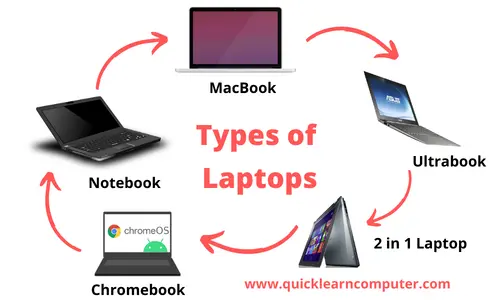
1. Chromebook
Chromebooks run on Google’s Chrome OS and are designed primarily for internet-based tasks.
Key Features:
- Cloud storage as the primary data-saving option.
- Fast boot times and minimal system maintenance.
- Pre-installed Google Workspace apps (Docs, Sheets, Slides).
- Lightweight and long-lasting battery.
- Best For: - Students, Casual users who rely on web apps and Budget-conscious buyers.
Popular brands: Acer, HP, Lenovo.
2. Ultrabook
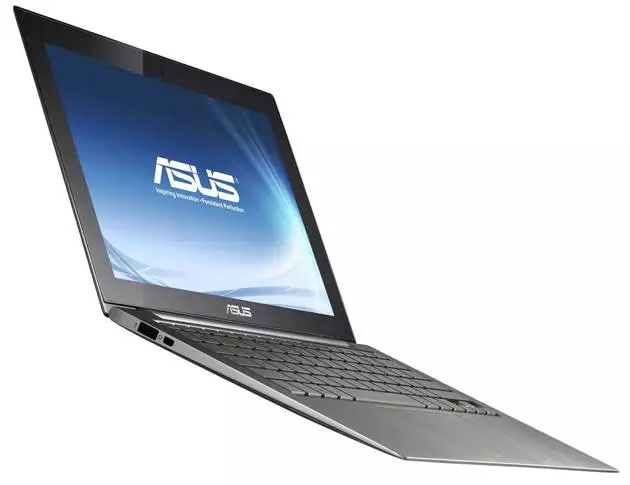
Ultrabooks are high-end laptops characterized by their ultra-slim design and powerful performance.
Key Features:
- Thin and lightweight (often under 3 lbs).
- Fast SSD storage and the latest Intel or AMD processors.
- Long battery life.
- Premium materials like aluminum and carbon fiber.
Best For - Professionals and business travelers, College students, Creatives needing portability and performance.
Popular models - Dell XPS 13, HP Spectre x360, ASUS ZenBook.
3. Netbook
Once popular for basic tasks, netbooks were mini laptops known for their compact size and affordability. However, they are now largely discontinued or replaced by tablets and Chromebooks.
Key Features:
- Small screen size (typically 10–12 inches).
- Low processing power.
- Very budget-friendly.
- Ideal for basic tasks like web browsing and emailing.
Best For - Previously ideal for travelers or secondary device users and Now mostly obsolete.
4. MacBook

MacBook refers to Apple’s range of laptops known for their sleek design, robust build quality, and seamless integration with macOS and other Apple products.
Key Features:
- macOS operating system.
- Premium Retina displays.
- M-series chips (Apple’s proprietary silicon).
- Seamless connectivity with iPhones, iPads, and Apple Watches.
Best For - Designers and developers, Video editors and photographers and Apple ecosystem users.
Variants: MacBook Air and MacBook Pro
5. MacBook Air
The MacBook Air is Apple’s thinnest and lightest laptop, offering a great balance of performance and portability.
Key Features:
- Ultra-slim and lightweight.
- Fanless design for silent operation.
- Powerful M1 or M2 chip.
- Excellent battery life (up to 18 hours).
Best For - Students, Professionals on the go and Everyday users who want reliability and performance.
6. Notebook: The All-Rounder
The term notebook is often used interchangeably with "laptop" but typically refers to standard portable computers that offer a good balance of features for general purpose use.
Key Features:
- Mid-range performance.
- Affordable to mid-tier pricing.
- Standard screen sizes (14 to 16 inches).
- Suitable for most day-to-day tasks.
Best For - Office work, School and college students and Home users.
Popular brands: Lenovo IdeaPad, Dell Inspiron, HP Pavilion
7. 2-in-1 Convertible Laptops
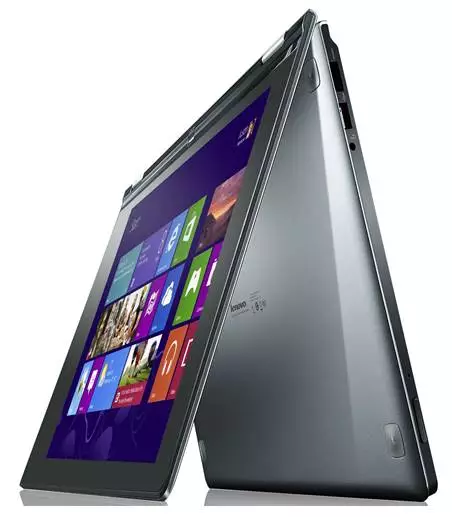
2-in-1 laptops combine the features of a traditional laptop and a tablet. These convertible devices can be used in multiple modes: laptop, tablet, tent, and stand.
Key Features:
- Touchscreen functionality.
- 360-degree hinge or detachable keyboard.
- Stylus support on some models.
- Lightweight and versatile.
Best For - Creative professionals, Presentations and drawing, Users who want both tablet and laptop in one device.
Popular models - Microsoft Surface Pro, Lenovo Yoga, HP Envy x360.
Comparison Table: Laptop Types at a Glance
| Type | Best For | Key Strengths |
|---|---|---|
| Chromebook | Students, casual users | Budget-friendly, fast, cloud-based |
| Ultrabook | Professionals, frequent flyers | Thin, powerful, long battery life |
| Netbook | Light tasks (now obsolete) | Ultra-compact, basic functionality |
| MacBook | Creative pros, Apple users | macOS, seamless Apple integration |
| MacBook Air | Everyday users, students | Light, silent, efficient |
| Notebook | General users, office work | Balanced specs, affordable |
| 2-in-1 Convertible | Designers, presenters | Versatile, touch & pen input |
How to Choose the Right Laptop for You
When deciding among the list of different types of laptops, consider the following:
- Purpose: Work, study, gaming, content creation?
- Operating System: Windows, macOS, or Chrome OS?
- Portability: Will you carry it daily or use it mostly at a desk?
- Performance Needs: Basic browsing or intensive computing?
Quick Tips:
- For budget buyers: Chromebook or Notebook.
- For creatives: MacBook or 2-in-1 Convertible.
- For travelers: Ultrabook or MacBook Air.
- For versatility: 2-in-1 laptops.
FAQS
1. What is the difference between a notebook and a laptop?
Technically, there is no major difference between a notebook and a laptop. Both refer to portable computers, but notebooks usually refer to mid-range devices with standard features, while laptops is a broader term that includes high-performance machines like ultrabooks and MacBooks.
2. Which is better: Chromebook or Laptop?
Chromebooks are great for web-based tasks and offer budget-friendly, fast, and secure experiences. However, laptops running Windows or macOS offer more versatility and offline functionality. The choice depends on your usage needs.
3. Is a MacBook a type of laptop?
Yes, a MacBook is a premium type of laptop designed and manufactured by Apple. It runs on macOS and is known for its build quality, performance, and integration with other Apple devices.
4. What is the most portable type of laptop?
Ultrabooks and the MacBook Air are considered the most portable due to their lightweight design, long battery life, and thin profile, making them perfect for people on the go.
5. Are netbooks still available in 2025?
Netbooks are mostly discontinued and replaced by more capable devices like Chromebooks and tablets. They were once popular for basic tasks but are no longer suitable for modern computing needs.
6. What is the best laptop type for students?
For students, Chromebooks, Notebooks, and MacBook Air are excellent options depending on budget. They offer good performance, portability, and battery life for school tasks, assignments, and virtual classes.
Conclusion
Understanding the types of laptop computer—from Chromebook to MacBook—empowers you to make a choice that fits your lifestyle and tasks.
Whether you need a lightweight ultrabook, a versatile 2-in-1, or a reliable notebook, the modern laptop market has something for everyone.
Use this laptop types guide to explore the list of different types of laptops and match your needs with the best possible device.
With the right information and priorities, selecting the perfect laptop becomes a straightforward and rewarding process.

I need prices of differences laptops brand new and uk fairly used
Will you guide me on what technology just dial share enquiries both vendor and user at a time
If you guide me today then i will be happy
Thanks, Pankaj
Help to know our where about of the computer