Computers are an essential part of our daily lives. Whether you’re using a laptop to study, a desktop computer at work, or a smartphone to browse the internet, you’re using a microcomputer.
These devices are designed for personal use and have become the most common type of computer worldwide.
During my 5+ years of teaching computer fundamentals, I’ve noticed that many beginners think a microcomputer is a “small computer” because of the word micro.
In reality, a microcomputer is any computer that uses a microprocessor as its central processing unit (CPU). Today, almost every personal computing device falls into this category.
In this article, you’ll learn what microcomputers are, explore various examples of microcomputers, understand their features, advantages, and real-life applications, and discover where you encounter them every day.
Table of Contents
What is a Microcomputer?
A microcomputer is a computer that uses a microprocessor as its CPU (Central Processing Unit). It is designed for use by one person at a time, making it ideal for personal, educational, and office tasks.
Unlike mainframe computers or supercomputers that serve many users simultaneously, microcomputers focus on individual computing needs.
Simple Definition – A microcomputer is a personal computer that contains a microprocessor and is designed for everyday computing tasks.
Examples include desktops, laptops, tablets, smartphones, and many embedded computing devices.
10 Examples of Microcomputers
Let’s explore the most common examples of microcomputers.
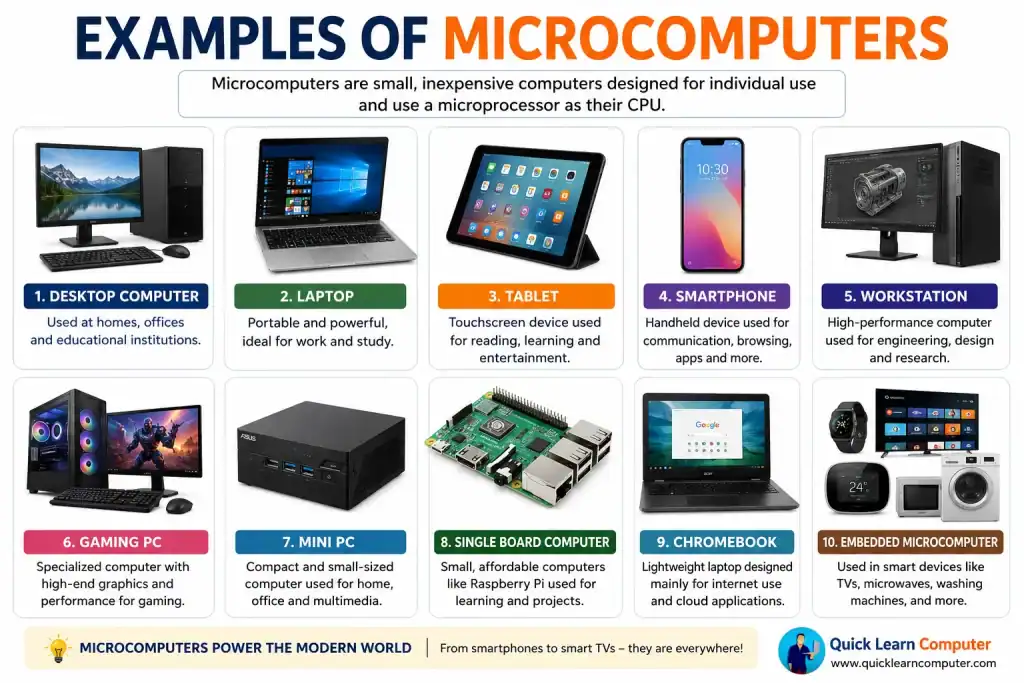
1. Desktop Computer
A desktop computer is one of the most popular types of microcomputers.
It usually consists of:
Common Uses
- Office work
- Programming
- Graphic design
- Online classes
- Gaming
- Internet browsing
Advantages
- High performance
- Easy to upgrade
- Larger display
- Comfortable for long working hours
2. Laptop
A laptop is a portable microcomputer that combines the monitor, keyboard, touchpad, battery, and processor into one compact device.
Common Uses
- College assignments
- Office work
- Remote work
- Video conferencing
- Content creation
Advantages
- Lightweight
- Portable
- Battery-powered
- Suitable for travel
During my classes, students often ask whether a laptop is different from a microcomputer. I explain that a laptop is simply one type of microcomputer, just like a desktop.
3. Tablet
A tablet is a touchscreen-based portable microcomputer.
Popular examples include:
- Apple iPad
- Samsung Galaxy Tab
- Microsoft Surface
Common Uses
- Reading eBooks
- Watching videos
- Online learning
- Drawing
- Taking notes
4. Smartphone
Modern smartphones are powerful microcomputers.
They contain:
- Microprocessor
- RAM
- Storage
- Operating System
- Internet connectivity
Common Uses
- Communication
- Online banking
- Navigation
- Photography
- Social media
- Learning apps
Many people don’t realize that the phone in their pocket is actually a powerful microcomputer.
5. Workstation
A workstation is a high-performance microcomputer designed for professional users.
It is commonly used for:
- Engineering
- Scientific research
- Video editing
- Animation
- CAD (Computer-Aided Design)
- 3D modeling
Compared to ordinary desktop computers, workstations have more powerful processors, additional memory, and advanced graphics capabilities.
6. Gaming PC
A gaming computer is another example of a microcomputer.
Its features include:
- High-end processor
- Powerful graphics card (GPU)
- Fast SSD storage
- High RAM capacity
- Advanced cooling system
Besides gaming, these computers are also useful for video editing and graphic design.
7. Mini PC
Mini PCs are compact desktop computers that occupy very little space.
Examples include:
- Intel NUC
- ASUS Mini PC
- Beelink Mini PC
They are commonly used for:
- Small offices
- Home entertainment
- Digital signage
- Educational labs
8. Single Board Computer (SBC)
A Single Board Computer is a complete computer built on one circuit board.
Popular examples include:
- Raspberry Pi
- Orange Pi
- BeagleBone Black
These are widely used for:
- Learning programming
- Robotics
- IoT (Internet of Things)
- Home automation
- Electronics projects
From my experience teaching beginners, Raspberry Pi helps students understand computer hardware much better because they can see and connect the individual components themselves.
9. Chromebook
A Chromebook is a lightweight laptop running ChromeOS.
It is widely used in:
- Schools
- Colleges
- Online learning
- Cloud computing
Advantages include:
- Fast startup
- Simple interface
- Long battery life
- Automatic updates
10. Embedded Microcomputer
Many electronic devices contain tiny embedded microcomputers.
Examples include:
- Smart TVs
- ATMs
- Washing machines
- Microwave ovens
- Smart refrigerators
- Car infotainment systems
Although users don’t see them directly, these microcomputers control the device’s operations.
Characteristics of a Microcomputer
Microcomputers share several important features:
- Uses a microprocessor as the CPU
- Designed for one user
- Compact in size
- Affordable compared to larger computers
- Easy to operate
- Supports multiple software applications
- Energy efficient
- Portable in many cases
These features make microcomputers suitable for students, professionals, businesses, and home users.
Real-Life Applications of Microcomputers
Microcomputers are used almost everywhere.
Some examples include:
- Schools for online learning
- Hospitals for patient records
- Banks for transactions
- Offices for documentation
- Shops for billing systems
- Airports for ticketing
- Factories for automation
- Homes for entertainment
A simple way I explain this concept to my students is by asking them to count how many microcomputers they use in a single day.
Most are surprised to discover they interact with several, including their smartphone, laptop, ATM, and smart TV.
During my teaching experience, I’ve found that students understand the concept much faster when I compare different microcomputers based on where they use them.
For example:
- Study → Laptop
- Office → Desktop
- Travel → Smartphone
- Design Studio → Workstation
- Robotics Lab → Raspberry Pi
This practical comparison helps beginners remember each type and its purpose.
Practical Scenario
Imagine a college student preparing a project.
They might use:
- A laptop to write the report.
- A smartphone to research information.
- A tablet to read PDFs.
- A desktop computer in the college lab for printing.
All of these are examples of microcomputers working together to complete a single task.
Key Takeaways
A microcomputer is a personal computer that uses a microprocessor.
It is designed primarily for single-user computing.
Common examples include desktop computers, laptops, tablets, smartphones, workstations, gaming PCs, Chromebooks, Mini PCs, and Raspberry Pi.
Microcomputers are widely used in homes, schools, businesses, hospitals, and industries.
Understanding their different types helps you choose the right device for your needs.
Frequently Asked Questions (FAQs)
1. What are the best examples of microcomputers?
The most common examples of microcomputers are desktop computers, laptops, tablets, smartphones, workstations, gaming PCs, Chromebooks, Mini PCs, and Raspberry Pi. These devices are designed for personal use and contain a microprocessor as their central processing unit (CPU).
2. What is the difference between a microcomputer and a personal computer?
There is no major difference in everyday usage. A personal computer (PC) is generally a type of microcomputer designed for individual users. The term “microcomputer” emphasizes that the device is built around a microprocessor.
3. Why is it called a microcomputer?
It is called a microcomputer because it uses a microprocessor as its CPU. The word “micro” refers to the microprocessor technology rather than the physical size of the computer.
4. Where are microcomputers used?
Microcomputers are used in many places, including:
- Homes
- Schools and colleges
- Offices
- Hospitals
- Banks
- Retail stores
- Libraries
- Factories
- Airports
- Government organizations
5. Is a Raspberry Pi a microcomputer?
Yes, A Raspberry Pi is a single-board microcomputer. It is widely used for learning programming, robotics, electronics projects, home automation, and Internet of Things (IoT) applications.
6. What is the difference between a microcomputer and a minicomputer?
A microcomputer is designed for one user and is commonly used as a personal computer. A minicomputer is more powerful, supports multiple users simultaneously, and is typically used by medium-sized organizations for shared computing tasks.
7. Can a gaming PC be called a microcomputer?
Yes, A gaming PC is a specialized type of microcomputer with high-performance components such as a powerful processor, dedicated graphics card, and large memory. It is designed for gaming as well as demanding tasks like video editing and 3D design.
8. What is the purpose of a microcomputer?
The primary purpose of a microcomputer is to help individuals perform everyday computing tasks such as creating documents, browsing the web, sending emails, attending online classes, programming, gaming, and managing digital files.
