Computers have become the backbone of modern technology, helping us perform tasks ranging from simple calculations to advanced artificial intelligence.
To understand how a computer works, it’s important to know about the functional units of computer.
These units are the fundamental building blocks that work together to process data, store information, and deliver results.
In this article, we will break down the different functional units of computer, explain their purpose, and provide real-world examples.
Whether you are a student, IT professional, or just curious about how computers operate, this guide will give you a clear understanding.
What Are the Functional Units of Computer?
The functional units of computer refer to the essential components that make up its architecture and ensure smooth computer operations. Each unit has a specific role, and together, they form a complete system.
Broadly, computers have the following major units:
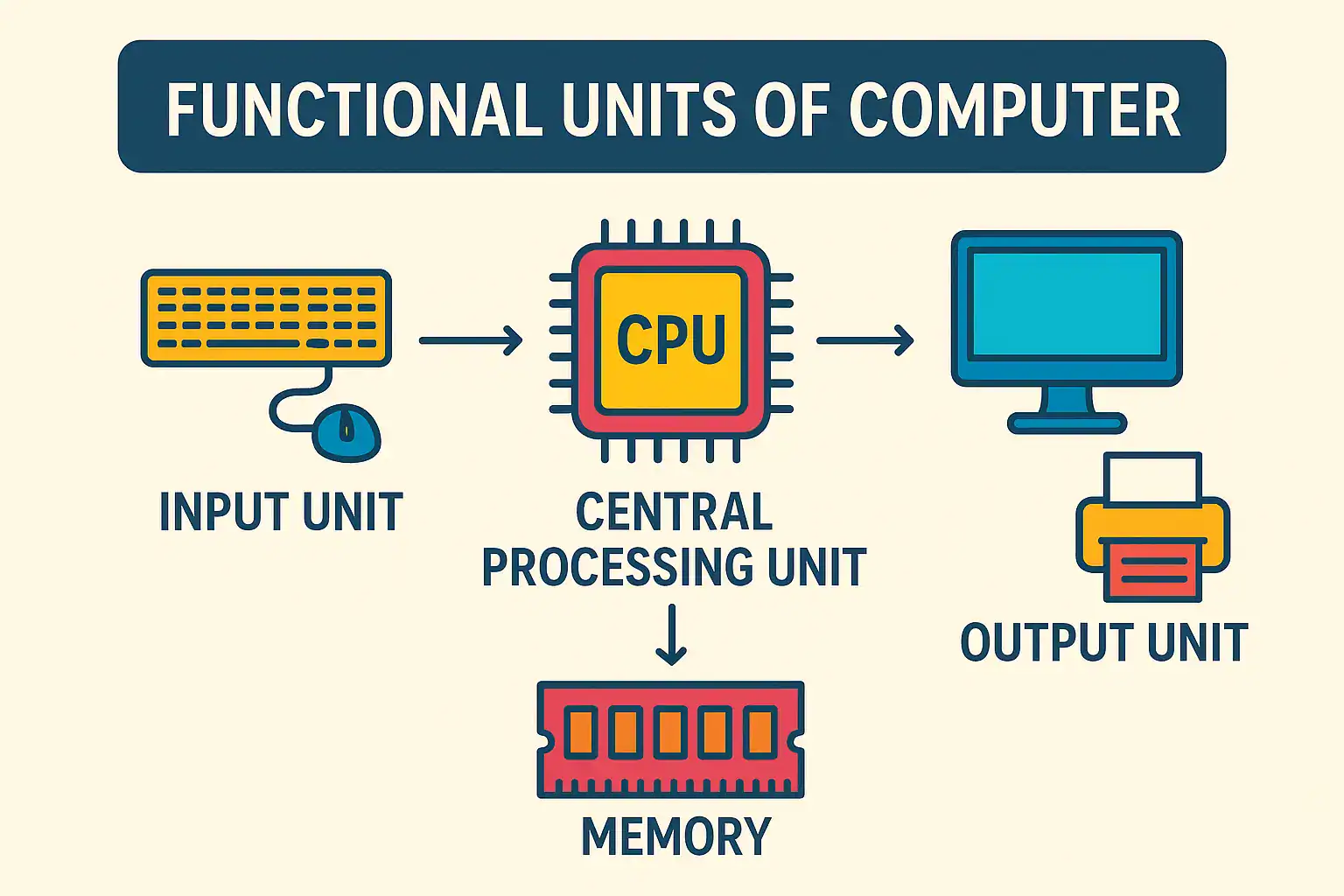
Input Unit
Output Unit
Memory Unit
Arithmetic and Logic Unit (ALU)
Control Unit (CU)
These units are interconnected through the system bus, enabling data and instructions to flow seamlessly.
Main Functional Units of Computer
1. Input Unit

The input unit is responsible for accepting data and instructions from the outside world and converting them into a form the computer can understand.
Functions of the Input Unit:
Accepts raw data (numbers, text, images, etc.).
Converts data into a machine-readable format (binary).
Sends the converted data to the memory unit for processing.
Examples: Keyboard, Mouse, Scanner and Microphone.
The input unit acts as the bridge between the user and the computer system, making interaction possible.
2. Output Unit

Once data is processed, the output unit delivers the results to the user in a human-readable form.
Functions of the Output Unit:
Converts processed data (binary form) into understandable information.
Displays results in text, graphics, or audio form.
Provides feedback to users for further input or decision-making.
Examples: Monitor, Printer, Speakers and Projector.
Without an output unit, the processed results would remain hidden inside the system.
3. Memory Unit
The memory unit stores data, instructions, and intermediate results. It plays a critical role in ensuring the smooth execution of programs.
Functions of Memory Unit:
Stores operating system, software, and user data.
Holds instructions before and after execution.
Provides quick access to frequently used data.
Types of Memory:
Secondary Memory (Hard Disk, SSDs) – Larger but slower.
Example: When you open a file, it is first loaded into RAM before being processed by the CPU.
4. Arithmetic and Logic Unit (ALU)
The ALU is the “brain” of the computer where actual computations take place. It performs mathematical and logical operations.
Functions of ALU:
Performs arithmetic operations (addition, subtraction, multiplication, division).
Executes logical comparisons (greater than, equal to, less than).
Works in coordination with the control unit to process instructions.
Example: When you calculate 25 + 30 on a calculator app, the ALU performs the addition.
5. Control Unit (CU)
The control unit is the central coordinator of all computer operations. It does not store or process data directly but ensures that every other unit functions properly.
Functions of Control Unit:
Directs data flow between input, memory, ALU, and output.
Interprets instructions and sends control signals.
Ensures correct sequence of execution.
Example: When running a program, the CU makes sure each instruction is executed step by step in the right order.
Interaction Between Functional Units of Computer
The power of a computer comes from how these units interact:
Input Unit feeds data into the system.
Memory Unit stores data and instructions.
Control Unit directs the ALU to process instructions.
ALU performs calculations and logical decisions.
Output Unit delivers the final result to the user.
This interaction creates a cycle of input → processing → output, which defines how computers work.
Examples of Functional Units in Daily Life
To make this concept clearer, here are some real-world examples:
Online Shopping:
Input: Typing product name.
Processing: Search algorithms (ALU + CU).
Output: Display of search results.
Video Streaming:
Input: Clicking a video.
Processing: Data decoding and buffering.
Output: Playing video on the screen.
Bank ATM:
Input: Inserting ATM card and PIN.
Processing: Verification of details.
Output: Displaying balance or dispensing cash.
Importance of Functional Units in Computer System
Understanding the functional units of computer with examples helps in:
Efficient Programming: Knowing how data flows makes coding more optimized.
Hardware Maintenance: Identifying which unit is malfunctioning helps in quick repair.
Career Growth: Students and IT professionals gain stronger fundamentals in computer science.
FAQs
1. What are the different functional units of computer?
The main functional units are Input Unit, the Output Unit, Memory Unit, Arithmetic and Logic Unit (ALU), and Control Unit.
2. Which unit is known as the brain of the computer?
The Arithmetic and Logic Unit (ALU), in coordination with the Control Unit, is often called the brain since it handles processing and decisions.
3. What are the units of a computer system with examples?
Units include Input (keyboard, mouse), Output (monitor, printer), Memory (RAM, HDD), ALU (calculations), and CU (control signals).
4. How do functional units of computer work together?
They work in a cycle: Input receives data, Memory stores it, CU directs the process, ALU performs operations, and Output presents the result.
5. Why is it important to study functional units of computer?
It helps in understanding computer architecture, designing better software, troubleshooting issues, and building strong fundamentals in computer science.
Conclusion
The functional units of computer are the backbone of every digital task we perform.
From input and output units to memory, ALU, and control unit, each plays a vital role in ensuring smooth and efficient operation. Understanding these units not only helps in academics but also gives deeper insights into how modern technology functions.
Next time you use a smartphone, ATM, or laptop, remember that these hidden units are silently working together to deliver seamless performance.
